Document analytics
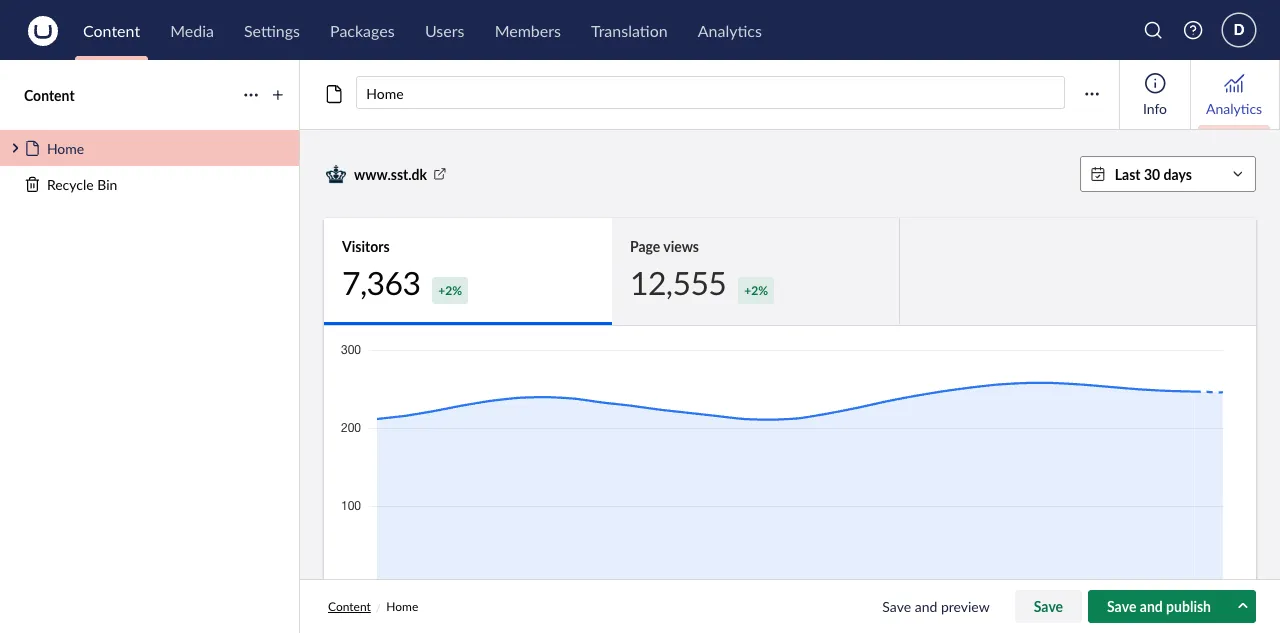
Map the nearest document root and types to show reports automatically filtered to the selected published route. Document reports do not require global Analytics-section access.
Document mappings are optional. A connection without a mapping remains available in the global Analytics section but does not add a document workspace report. Document reports do not require global Analytics-section access.
Map an Umbraco site root
For each site that needs page-level reports, choose the root document in the connection’s Page analytics settings. A document uses the connection from its nearest mapped ancestor; it does not use a connection from merely any ancestor root. A mapped document report is automatically filtered to its selected published route.
Then either enable all document types below that root or choose the specific document types that should show the Analytics workspace view.
When the workspace appears
A document shows its Analytics workspace view only when all of these conditions are met:
- It is published and has a published route.
- Its nearest configured document root must specifically resolve to a connection, not merely any ancestor root.
- Its document type is enabled for that connection.
- The current user can access the Content section and browse that document.
This lets an editor inspect the page they are working on without first finding it in a global report.
Multi-site example
Imagine one Umbraco installation with two site roots:
| Root document | Connection | Result |
|---|---|---|
Brand A |
Vercel project A | Documents below Brand A report against project A. |
Brand B |
Plausible site B | Documents below Brand B report against site B. |
If a nested root is mapped too, it wins for documents below it because it is the nearest mapped ancestor.
Permissions
Global and document analytics are intentionally separate:
| User | Global Analytics | Document Analytics | Settings |
|---|---|---|---|
| Administrator | Yes | Yes, where mapped | Yes |
| Analytics-section user | Yes | Only with Content access and document browse permission | No |
| Editor with Content access and document browse permission | No | Yes, where mapped and published | No |
This means an editor can see analytics for a document they can browse without gaining access to global site reporting.
Document reports do not require global Analytics-section access.
Troubleshoot a missing workspace
Check publication and route state first, then the nearest root mapping and document-type setting. If the workspace still does not appear, verify Content-section access and document browse permission. See troubleshooting for the full symptom checklist.